Self-hosted
Runs on your servers, your domain. Content never touches a vendor's cloud. The whole point.
Open source, self-hosted Confluence exit
One guided export moves your whole Confluence space onto a wiki you own. Images included. An integrity report checks every page and image against your source and names anything missing.
Same AI, same question. Each person only sees what they are cleared for.
Confluence got expensive, so you are leaving. But every export drops something, and you usually find out months later, when someone opens a page and the diagram is gone.
Per-seat pricing that climbs every renewal, for features most of the team never touches.
Every migration tool, even Atlassian's own, quietly drops images, flattens the page tree, and breaks permissions. Silent loss you can't prove or undo.
Once it has moved, you'll point an AI assistant at it, and it can surface an HR file or board deck to the wrong person. Letwrites is ready for that too.
Simple enough for your IT team to run in an afternoon. No vendor in the loop.
One command stands up Letwrites on your server with automatic HTTPS. It runs on your infrastructure, and the content and the domain are yours.
Click “Export to HTML” in Confluence, point Letwrites at the zip, and your whole space lands on your wiki: pages, structure, permissions, and the images other tools quietly drop. You get back a migration integrity report (every page and image in your source versus what actually landed, with anything missing named) so “nothing was lost” is provable, never a silent surprise.
Admins create roles (HR, Security, Engineering) and set who can see each shelf, book, or page, down to a single doc. This one permission model is the source of truth, and it governs both people and AI agents. Set access once, it covers everything.
Connect an AI agent and every read is checked against the exact permissions your IT set, then written to a tamper-evident log of who, and which agent, accessed what. The agent is treated as untrusted, so it cannot return a document the person asking isn't cleared for. The permission engine and audit are in the free core today. The connector that plugs your agent in is the layer we build with our first customers.
An agent answers over your wiki, but only ever from what the person asking is allowed to see.
And every access is logged, tamper-evident: verify → {"valid":true}. Edit the log to hide an access and it flips to {"valid":false}.
The core is free and yours to run: the wiki, the Confluence migration, permission-safe agent access, and an audit log. Pull the image, point a domain, and you have a production Letwrites on your servers. No account, no purchase order, no data leaving your walls.
# clone, set your domain, and bring it up
$ git clone https://github.com/Lynne-ang/letwrites && cd letwrites/wiki/deploy
$ docker compose up -d
wiki, permission engine, and database, behind auto-HTTPS
SSO (OIDC, SAML, LDAP) is included free. Need the governance dashboard, self-service team groups, managed agent access, or hosting? Those are paid add-ons, but the core stays free and your data stays on your servers. See pricing →
Agents enforce your existing permissions on every read. The agent is treated as untrusted, so it can't be tricked into leaking a document the person asking isn't cleared for.
Confluence to your wiki: text, code, images, tables, hierarchy, links. A report lists exactly what needs a human.
Hash-chained log of every allowed and denied access. Edit it and verification breaks, provably.
Runs on your servers, your domain. Content never touches a vendor's cloud. The whole point.
Works with Claude, Copilot, Cursor, internal bots, any agent. Not locked to one AI vendor.
Roles and per-page permissions, managed in one place, governing both humans and AI.
People create and run their own sharing groups without an admin ticket. No escalation, no peeking at other teams' content: the broker does it on their behalf with fixed guardrails. IT stops being the bottleneck for access.
Free gets you off Confluence and lets agents read your wiki safely. The subscription is for when agents start to write, and when someone has to prove it's under control.
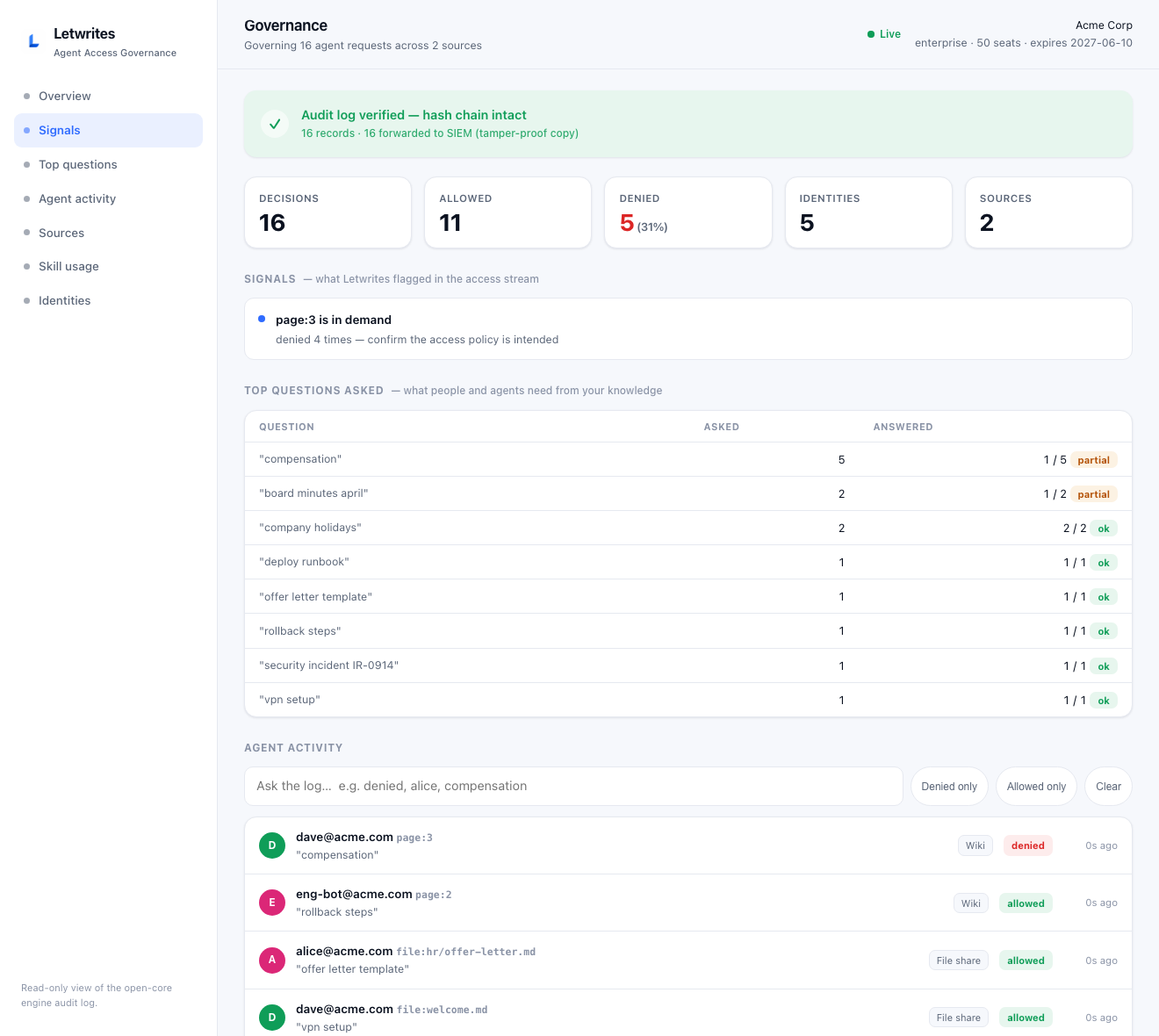
The dashboard your CISO logs into: every agent read and write, who asked what, what your people can't find, and live audit integrity — on your own servers.
Your agent drafts the runbook and files it in the right book, but a person approves before it goes live. Every write is bound to a real identity, not a shared token.
The dashboard surfaces the questions asked most, and the ones that keep coming back unanswered, so you know exactly what to document next.
Every agent read and write, in a log that can't be quietly edited and is copied to your security tools. Change it and an alert fires. Then generate a signed report your auditor verifies on their own, proof your agents stayed in bounds.
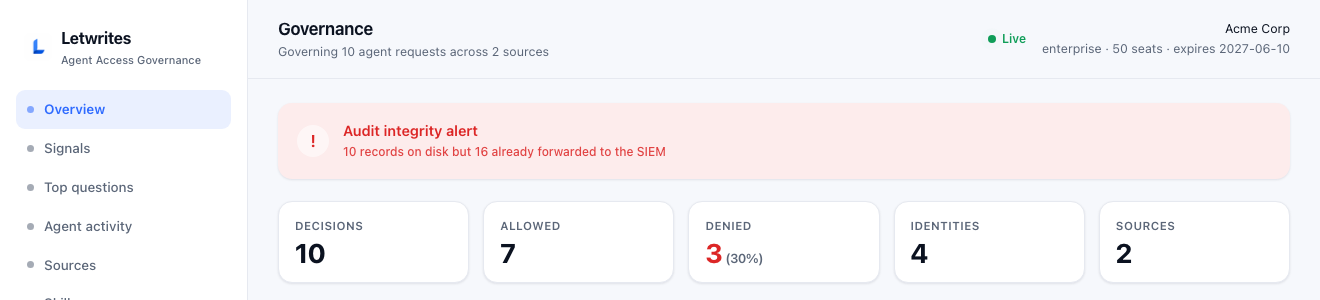
Delete or edit a single log line and it turns red. Your security tools already kept the original.
The wiki, SSO, migration and agent search are free forever. You pay only when you want agents to safely write to the wiki, plus the dashboard and the locked audit trail. It still runs on your own servers. Start with a 14-day free trial, and it's about 40% cheaper than Confluence.
A "seat" is a person whose agent writes to the wiki, not someone who only reads it (readers are unlimited and free). Every paid plan starts with a 14-day free trial. Community is free under Apache 2.0, forever, with unlimited wiki users.
Migrate free, watch an agent get blocked from a doc it shouldn't see, read the audit log. When you're ready for governed agent write-back, start a 14-day Team trial — cancel anytime.