Open source, self-hosted Confluence exit

Leave Confluence with nothing left behind.

One guided export moves your whole Confluence space onto a wiki you own. Images included. An integrity report checks every page and image against your source and names anything missing.

Same AI, same question. Each person only sees what they are cleared for.

Images come across
Every page and image checked against your source
A wiki you own, no lock-in

Getting out of Confluence loses your stuff.

Confluence got expensive, so you are leaving. But every export drops something, and you usually find out months later, when someone opens a page and the diagram is gone.

Confluence costs too much

Per-seat pricing that climbs every renewal, for features most of the team never touches.

The images don't come across

Every migration tool, even Atlassian's own, quietly drops images, flattens the page tree, and breaks permissions. Silent loss you can't prove or undo.

Then you'll want AI on it

Once it has moved, you'll point an AI assistant at it, and it can surface an HR file or board deck to the wrong person. Letwrites is ready for that too.

How it works

From Confluence to safe, in four steps.

Simple enough for your IT team to run in an afternoon. No vendor in the loop.

1

Deploy on your own domain

One command stands up Letwrites on your server with automatic HTTPS. It runs on your infrastructure, and the content and the domain are yours.

# Caddy auto-TLS, wiki, permission engine, database cd letwrites/wiki/deploy && cp .env.example .env # set docs.yourcompany.com ./deploy.sh → https://docs.yourcompany.com
2

Bring everything over, images and all

Click “Export to HTML” in Confluence, point Letwrites at the zip, and your whole space lands on your wiki: pages, structure, permissions, and the images other tools quietly drop. You get back a migration integrity report (every page and image in your source versus what actually landed, with anything missing named) so “nothing was lost” is provable, never a silent surprise.

npm run import -- --from-confluence-export ./confluence-export MIGRATION INTEGRITY REPORT, complete Pages 412 of 412, images 1,038 of 1,038 moved, verdict COMPLETE
images come acrosspage tree kepttables and codesource checked, nothing lost
3

Your IT team controls access

Admins create roles (HR, Security, Engineering) and set who can see each shelf, book, or page, down to a single doc. This one permission model is the source of truth, and it governs both people and AI agents. Set access once, it covers everything.

Roles and groupsPer-page permissionsSSO included (OIDC, SAML, LDAP)Instant revocation
4

Agents read safely, and audited

Connect an AI agent and every read is checked against the exact permissions your IT set, then written to a tamper-evident log of who, and which agent, accessed what. The agent is treated as untrusted, so it cannot return a document the person asking isn't cleared for. The permission engine and audit are in the free core today. The connector that plugs your agent in is the layer we build with our first customers.

Permission-enforcedBring your own agentTamper-evident auditFail-closed

Same AI. Same question. Different access.

An agent answers over your wiki, but only ever from what the person asking is allowed to see.

AliceHR
"What are the 2026 comp bands and the on-call policy?"

→ On-call Policy: …
Compensation Bands 2026: L5 150k to 200k…
Sees both, she's authorized
BobEngineering
"What are the 2026 comp bands and the on-call policy?"

→ On-call Policy: …

(1 document withheld, not authorized)
Comp blocked, not even the title leaks

And every access is logged, tamper-evident: verify → {"valid":true}. Edit the log to hide an access and it flips to {"valid":false}.

Free forever, Apache-2.0, self-hosted

Build your own. It's open source.

The core is free and yours to run: the wiki, the Confluence migration, permission-safe agent access, and an audit log. Pull the image, point a domain, and you have a production Letwrites on your servers. No account, no purchase order, no data leaving your walls.

Self-host
# clone, set your domain, and bring it up
$ git clone https://github.com/Lynne-ang/letwrites && cd letwrites/wiki/deploy
$ docker compose up -d
wiki, permission engine, and database, behind auto-HTTPS

SSO (OIDC, SAML, LDAP) is included free. Need the governance dashboard, self-service team groups, managed agent access, or hosting? Those are paid add-ons, but the core stays free and your data stays on your servers. See pricing →

A wiki that's also a security layer.

Permission-safe agent access

Agents enforce your existing permissions on every read. The agent is treated as untrusted, so it can't be tricked into leaking a document the person asking isn't cleared for.

# same query, two people Alice (HR) → comp bands returned Bob (Eng) → withheld, not authorized

Honest migration

Confluence to your wiki: text, code, images, tables, hierarchy, links. A report lists exactly what needs a human.

Tamper-evident audit

Hash-chained log of every allowed and denied access. Edit it and verification breaks, provably.

Self-hosted

Runs on your servers, your domain. Content never touches a vendor's cloud. The whole point.

Vendor-neutral

Works with Claude, Copilot, Cursor, internal bots, any agent. Not locked to one AI vendor.

IT in full control

Roles and per-page permissions, managed in one place, governing both humans and AI.

Self-service team groups · paid

People create and run their own sharing groups without an admin ticket. No escalation, no peeking at other teams' content: the broker does it on their behalf with fixed guardrails. IT stops being the bottleneck for access.

The paid layer

What your team unlocks.

Free gets you off Confluence and lets agents read your wiki safely. The subscription is for when agents start to write, and when someone has to prove it's under control.
docs.yourcompany.com/governance
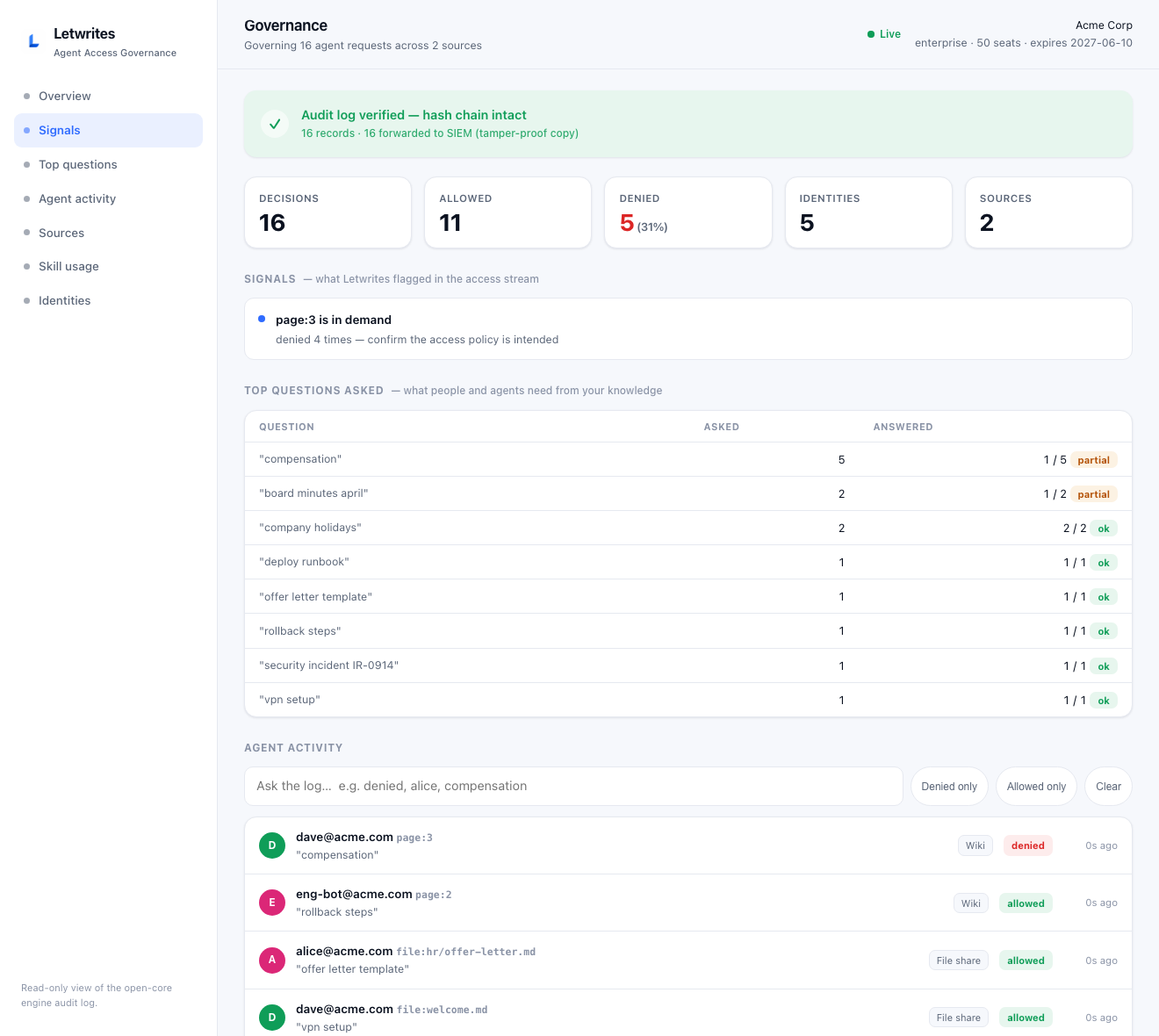
The Letwrites governance dashboard: a green 'audit log verified' banner, KPIs for decisions/allowed/denied/identities/sources, a 'page in demand' signal, a Top Questions Asked table showing which questions get answered, and a live agent-activity feed with per-person allowed and denied decisions across the wiki and a file share.

The dashboard your CISO logs into: every agent read and write, who asked what, what your people can't find, and live audit integrity — on your own servers.

Agents that write, with a human in the loop

Your agent drafts the runbook and files it in the right book, but a person approves before it goes live. Every write is bound to a real identity, not a shared token.

# agent finishes a task agent → proposes "Q3 Runbook" pending approval you → approve published, logged as you

See what your people can't find

The dashboard surfaces the questions asked most, and the ones that keep coming back unanswered, so you know exactly what to document next.

Prove every action to an auditor

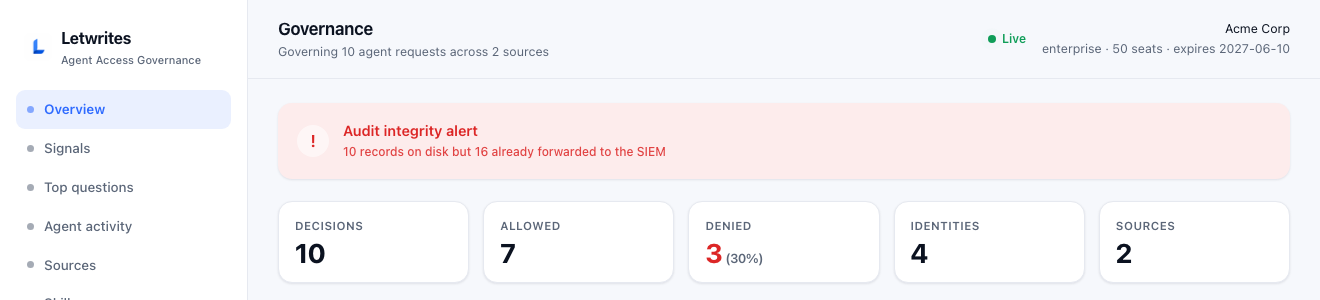
Every agent read and write, in a log that can't be quietly edited and is copied to your security tools. Change it and an alert fires. Then generate a signed report your auditor verifies on their own, proof your agents stayed in bounds.
docs.yourcompany.com/governance
The same dashboard showing a red audit integrity alert: 10 records on disk but 16 already copied to the security tools, showing that deleting or editing the log is detected immediately.

Delete or edit a single log line and it turns red. Your security tools already kept the original.

How to turn it on
Pricing

Self-host free. Add governed AI for $3 a seat.

The wiki, SSO, migration and agent search are free forever. You pay only when you want agents to safely write to the wiki, plus the dashboard and the locked audit trail. It still runs on your own servers. Start with a 14-day free trial, and it's about 40% cheaper than Confluence.

50 writers
$1,800 / year, self-hosted
vs Confluence you save $1,200 a year (40%)
You pay only for people whose agent writes — readers are free. $3/seat/mo · 14-day free trial · billed monthly or annually
Community
$0 / forever
Self-hosted, open source. Everything you need to leave Confluence.
  • The wiki, unlimited users and pages
  • SSO included: Google, Okta, SAML, LDAP
  • Roles and per-page permissions
  • Confluence to Letwrites migration
  • Permission-safe agent read + search skills, audit log
  • 14-day free trial of every paid feature
  • Self-host on your domain (Docker or Kubernetes)
Self-host free
Most popular
Team
$3 / governed seat / mo
Let agents safely write back, and prove every action. Self-hosted. 14-day free trial, then billed monthly or annually.
  • Everything in Community (incl. SSO)
  • Self-service team groups: people create and run their own sharing groups, no admin ticket, with no way to reach another team's content
  • Agents can write to the wiki: the agent drafts, a person approves
  • A dashboard of every agent action, what was blocked, and what people can't find
  • A locked audit trail you can send to your security tools
  • A signed report for auditors, verifiable on its own
  • Skill-usage analytics + self-hosted backup monitoring
  • Email support
Already have a key? Turn it on
Enterprise
Custom / 500+ seats
Volume pricing and white-glove help for large or regulated, air-gapped deployments.
  • Everything in Team
  • Volume pricing: $30/seat past 100, $24/seat past 500
  • Verified SSO / OIDC identity binding (JWKS)
  • Air-gapped / offline deployment support
  • Dedicated onboarding + security-review help
  • SLA
Talk to us

A "seat" is a person whose agent writes to the wiki, not someone who only reads it (readers are unlimited and free). Every paid plan starts with a 14-day free trial. Community is free under Apache 2.0, forever, with unlimited wiki users.

The things IT and security ask first.

Is it really free?
Yes. The Community edition is open source (Apache-2.0) and free forever, with no limit on wiki users. You self-host it. You only pay when you want agents to write to the wiki (with a person approving), the dashboard, and the locked audit trail. Even then you keep self-hosting, and your data stays on your servers.
Do you ever see our data?
No, never. Letwrites runs entirely on your servers. The paid features unlock with a license key, the same way a software product key works: the key is checked on your machine with offline math, so nothing phones home and nothing is uploaded. The dashboard reads your own audit log and shows it to your admins, in your building. The only thing that reaches us is your yearly payment, through the contract, not through the software.
Do we have to pay for SSO?
No, SSO is included in the free Community edition. Log in with Google, Okta, Azure AD, any SAML 2.0 or OIDC provider, or LDAP. What's paid is the governance on top: letting agents write to the wiki safely, the dashboard that shows what every agent did, and the locked audit trail. The login itself is free. Setup, with the gotchas handled, is a paste-to-your-agent block in the onboarding guide.
Where does our data live?
On your servers, on your domain. Letwrites is self-hosted by design, so your knowledge never touches our cloud. That's the core difference from Glean, Notion, or Confluence Cloud.
Can our IT team control who sees what?
Completely. IT are the admins. They define roles and set permissions down to a single page. That one permission model governs both human browsing and AI agent reads, so you set access once and it covers everything. Revoking access takes effect on the next read.
Which AI agents does it work with?
Any of them. Letwrites is vendor-neutral: Claude, Copilot, Cursor, or your own internal agents connect through a standard interface. We're the safe knowledge layer, not another AI vendor.
Is there a free trial, and what's a "seat"?
Every paid plan starts with a 14-day free trial of all paid features — cancel before it ends for $0. After that you pay per seat, where a "seat" is one person whose agent writes to the wiki through the gateway in a given month (readers, and people who edit by hand, are unlimited and free). Inactive people automatically free their seat after 30 days.
What is a SIEM, and do we need one?
It's the central security log that a security team watches, like Splunk or Microsoft Sentinel. Letwrites can send a copy of every agent action there, so your security team sees it next to everything else and the record survives even if someone edits the copy on the wiki server. If your team doesn't use one, you don't need it. The audit trail still works on its own.
How do you prove the audit log wasn't changed?
Every entry is locked to the one before it, like links in a chain. A built-in check re-walks the chain, and if anyone edits, deletes, or reorders an entry, the check fails and points to the broken one. The dashboard turns red, and if you forward the trail to your security tools, the original copy is already safely there.
Can we hand an auditor proof?
Yes. The paid layer generates a signed attestation report from the audit: who ran which agent, what was allowed or blocked, and confirmation the log is intact. Your auditor can verify it on their own with our published key, and Letwrites can counter-sign it for the strongest assurance. A free or unlicensed install can't produce a valid one, so the report itself proves it came from a real, licensed, governed deployment.
How clean is the Confluence migration?
Text, headings, lists, code blocks, tables, images, and cross-page links convert cleanly and hierarchy is preserved. Confluence-specific macros (Jira, drawio, and the like) can't be auto-converted, so we list every one in a migration report with its page, for a human to handle. We never silently mangle.

Run it against one Confluence space.

Migrate free, watch an agent get blocked from a doc it shouldn't see, read the audit log. When you're ready for governed agent write-back, start a 14-day Team trial — cancel anytime.